

If you're just starting out, you've probably run into a common problem: confusing what each language actually does, or assuming you need to master all three at once before you can build anything real. You don't.
This article breaks down what HTML, CSS, and JavaScript each do on their own, how they work together in the browser, where front-end coding fits into the larger web development process, and whether these three languages alone are enough to land a job.
Key Takeaways
- HTML structures content, CSS styles it, and JavaScript adds interactivity: together they make up the front end
- Web development follows a structured process with roughly seven stages, and coding is just one part of it
- Front-end fundamentals are the foundation, but most roles also expect frameworks, backend skills, or databases
- An industry-recognized certification validates these skills when you apply for entry-level developer roles
What Is Web Development, and Where Do HTML, CSS, and JavaScript Fit In?
Web development is the process of building, coding, and maintaining websites and web applications. It covers two distinct sides of the work:
- Front-end (client-side) development: everything that runs in the user's browser and controls what they see and click
- Back-end (server-side) development: the servers, databases, and application logic that power what happens behind the scenes
HTML, CSS, and JavaScript are specifically front-end technologies. According to MDN's web development documentation, client-side code has little or no access to the underlying server operating system. Its job is purely to render and manage the page inside the browser window.
Back-end code, by contrast, validates form submissions, stores and retrieves data from databases, and decides what content actually gets sent to the browser in the first place.
Think of the front end as the storefront and the back end as the warehouse and cash register behind it. You need both, but they require different skill sets. That distinction matters once you start mapping out where you want your career to go.
The Three Building Blocks of Every Website: HTML, CSS, and JavaScript Explained
HTML is the skeleton of a webpage, CSS is the skin and clothing, and JavaScript is the muscles that let it move. Each language has one job, and none of them can fully replace the others.
HTML: Structuring Your Content
HTML (HyperText Markup Language) creates the skeleton of a page using elements like headings, paragraphs, links, and images. Every element follows the same basic pattern: an opening tag, content, and a closing tag.
<h1>Welcome to My Site</h1>
<p>This paragraph explains what the site is about.</p>
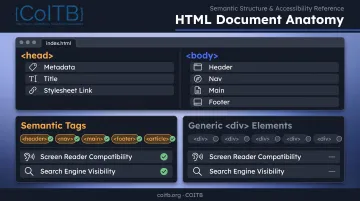
A webpage is split into two main parts:
- The
<head>— contains metadata, the page title, and links to stylesheets (not visible to visitors) - The
<body>— contains everything that actually displays on the page
Semantic HTML uses tags like <header>, <nav>, and <button> instead of generic <div> elements.
MDN notes that search engines weigh keywords in headings and links more heavily than keywords buried in non-semantic containers, and screen readers rely on proper headings to navigate a page. Skip that structure and you weaken both SEO and accessibility before styling even starts.
CSS: Styling and Layout
CSS (Cascading Style Sheets) controls presentation: colors, fonts, spacing, and layout. It works through selectors (which elements to target) and declaration blocks (what styles to apply).
There are three ways to apply CSS:
- Inline — styles written directly on an HTML element (quick, but hard to maintain)
- Internal — styles placed in a
<style>block within the page's<head> - External — styles kept in a separate
.cssfile and linked to the page
External stylesheets are the industry standard. They keep styling separate from structure, making sites easier to update and maintain across dozens (or thousands) of pages.
Responsive design isn't optional anymore. According to StatCounter's July 2025 platform data, mobile devices account for 52.61% of worldwide web traffic, edging out desktop at 45.89%. If your CSS doesn't adapt with media queries, you shut out more than half your audience on arrival.
JavaScript: Adding Interactivity
JavaScript is a full programming language, not a markup or styling language. It adds logic, behavior, and dynamic updates through the DOM (Document Object Model), the browser's programmatic representation of the page.
When a user clicks a button, submits a form, or scrolls down, JavaScript listens for that action and responds. Common real-world uses include:
- Form validation — checking input before it's submitted
- Sliders and carousels — updating content as users interact with range inputs or navigation arrows
- Real-time updates — pushing new data to a page without a full reload
- Dynamic calculations — instantly updating totals, prices, or results as users type
JavaScript turns a static page into an application that can handle logic, user input, and live updates HTML and CSS cannot.
How HTML, CSS, and JavaScript Work Together in Real Web Development
Picture a button on a webpage. HTML defines the button element. CSS makes it blue with rounded corners. JavaScript listens for a click and changes the button's text when it happens. Three languages, one small interaction: that pattern sits behind nearly every feature you'll build.
Here's what the browser actually does behind the scenes:
- Parses HTML into a DOM tree, the structural map of the page
- Parses CSS and builds the CSSOM, applying style rules to that structure
- Combines both into a render tree, then calculates layout
- Runs JavaScript, which can modify either the DOM or CSSOM on the fly
- Paints the final result to the screen
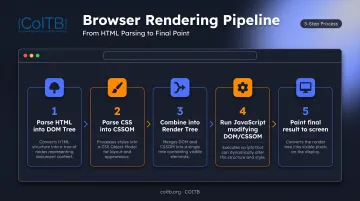
This pipeline holds true whether you're building a single landing page or a complex application in React. Frameworks like React don't replace HTML, CSS, and JavaScript. They organize and automate how you write them. Under the hood, a React app still produces HTML elements, still gets styled with CSS, and still runs on JavaScript.
Knowing how these three layers interact is the skill that turns syntax knowledge into a working site. You can memorize each language in isolation. Real progress shows up when you can trace how a CSS class conflict breaks a click handler, or why a script in the wrong spot in your HTML blocks the page from loading.
The 7 Stages of the Web Development Process
Writing code is only one piece of building a website. Most projects, whether a freelance client site or an enterprise application, move through a structured lifecycle:
| Stage | What Happens |
|---|---|
| 1. Planning | Define goals, scope, and requirements for the site or app |
| 2. Design/Wireframing | Map out layout, user flow, and visual direction before coding begins |
| 3. Front-end Development | Build what users see using HTML, CSS, and JavaScript |
| 4. Back-end Development | Build the server logic, APIs, and database connections |
| 5. Testing/QA | Find and fix bugs, check cross-browser and cross-device behavior |
| 6. Deployment | Push the finished site live for real users |
| 7. Maintenance | Apply updates, patches, and ongoing improvements |
Notice where HTML, CSS, and JavaScript sit in this process: almost entirely in stage three. Front-end skills remain essential, but they are one contribution within a larger team effort.
Even if you only work on the front end, understanding the full pipeline helps you communicate with back-end developers, designers, and QA testers handling the other stages.
Is HTML, CSS, and JavaScript Enough for Web Development?
Short answer: Yes, for static websites and portfolio projects. No, for most paid developer roles.
You can absolutely build a complete, good-looking, functional website using just these three languages: a portfolio, a small business site, a landing page. That's real, valuable work. But once you look at what employers are actually hiring for, the picture shifts.
According to O*NET's 2025 job posting data for web developer roles, employer requirements break down like this:
- JavaScript — 47% of postings
- React — 35% of postings
- Git (version control) — 22% of postings
- Python — 21% of postings
- SQL — 21% of postings
- Node.js — 18% of postings
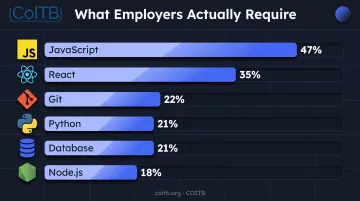
That's a clear signal: knowing HTML and CSS gets your foot in the door, but employers increasingly expect a JavaScript framework, a backend language, database familiarity, and version control on top of it.
Skills Worth Adding
- A JavaScript framework/library — React is the most requested by a wide margin
- A backend language — Python is common and beginner-friendly
- Database knowledge — MySQL and SQL show up across a large share of listings
- Version control — Git and GitHub are near-universal expectations, even for junior roles
If you're self-taught or finished a bootcamp without a traditional CS degree, a third-party certification can help prove these skills to employers. COITB offers ISO/IEC 17024-aligned credentials that map to each layer of this stack: HTML-CSS Web Designer, JavaScript Professional Developer, ReactJS Framework Developer, Professional Python Developer, and MySQL Backend Developer.
Exams run 75–90 minutes with scenario-based questions. Passing earns a publicly verifiable digital badge you can add to your résumé or LinkedIn.
For a hiring manager reviewing candidates without formal degrees, that verification carries real weight. It shows you can do the work—not only that you finished a course.
Frequently Asked Questions
How are HTML, CSS, and JavaScript used in web development?
HTML structures a page's content, CSS controls how it looks, and JavaScript makes it interactive. Together they form the front end of nearly every website.
What are the 7 stages of web development?
The typical stages are planning, design/wireframing, front-end development, back-end development, testing/QA, deployment, and maintenance. HTML, CSS, and JavaScript primarily come into play during the front-end development stage.
Is HTML, CSS, and JavaScript enough for web development?
They're enough to build static websites and strong portfolio projects. Most paid developer roles, however, also expect frameworks like React, a backend language, and database skills.
What order should I learn HTML, CSS, and JavaScript in?
Learn HTML first, then CSS, then JavaScript. This order makes sense because you need structured content before you can style it, and styled content before you can add interactivity.
How long does it take to learn HTML, CSS, and JavaScript?
Basic proficiency in all three typically takes 3-6 months of consistent, part-time study. Job-readiness usually takes longer, closer to 6-12 months, depending on your pace and prior experience.
Do I need a certification to get a web developer job?
Certifications aren't required, but they strengthen a résumé when you lack a degree or formal work history. Credentials such as COITB's HTML-CSS Web Designer and JavaScript Professional Developer certifications give employers a verifiable way to confirm your skills before an interview.