IT certifications cut through that confusion. They give you a structured, proven target: study specific skills, pass a standardized exam, earn a credential that employers can independently verify. No four-year detour required.
This guide is for career changers, bootcamp graduates, self-taught developers, and anyone who wants to validate real technical skills without starting from scratch. You'll walk away knowing exactly how to get an IT certification — from assessing where you are today to maintaining your credential long-term.
Key Takeaways
- IT certifications validate job-ready skills and serve as third-party proof of competence for any background
- The 5 steps: assess your skills, choose the right cert, prepare for the exam, register and take it, then update your profile and plan renewal
- Most entry-level certifications have no formal prerequisites and can be earned within a few months of focused study
- The best certification matches your target role and experience level, not just name recognition
- After passing, add the credential to your resume and LinkedIn and track your renewal date from day one
What Are IT Certifications and Why Do They Matter?
IT certifications are credentials awarded by a certification body — either vendor-specific (tied to one company's tools) or vendor-neutral (validating broader, platform-independent skills) — after a candidate passes a standardized exam. They prove demonstrated, tested competence — not just self-reported experience.
Why Employers Pay Attention
For hiring managers, a certification answers a question that a resume often can't: has this person actually been tested on these skills? That matters most when a candidate is self-taught, a bootcamp graduate, or switching from a completely different field.
According to ISC2's 2025 cybersecurity hiring survey, 89% of hiring managers would consider a candidate whose only experience was an entry-level cybersecurity certification, and 47% rated IT certifications as a critical attribute when evaluating entry-level applicants.
Those numbers reflect a real shift: employers increasingly prioritize what candidates can demonstrate over where they went to school or how long they've worked in tech.
Vendor-Specific vs. Vendor-Neutral Credentials
| Type | What it validates | Example | |------|-------------------|---------|| | Vendor-specific | Skills tied to one platform | AWS, Cisco, Microsoft | | Vendor-neutral | Broad, platform-independent skills | CompTIA A+, ISO/IEC 17024-aligned programs |
Vendor-neutral certifications validate skills that transfer across employers and technologies — not just one company's ecosystem. Those aligned to ISO/IEC 17024 (the international standard for personnel certification bodies) carry additional weight because they follow consistent, auditable credentialing processes.
COITB's seven certifications meet this standard, which means each exam is governed by structured, independently verifiable processes — not a self-issued badge. In practical terms, that alignment signals to employers:
- Exam content is mapped to real-world job skills, not proprietary tooling
- Passing scores reflect a consistent, tested benchmark
- The credential is portable across employers and industries
How to Get an IT Certification in 5 Steps
Step 1: Assess Your Current Skills and Career Goals
Before you spend money on an exam, take stock of what you already know. Can you write basic HTML? Have you built anything in Python? Do you understand networking fundamentals? Your starting point determines which certification level makes sense.
Two practical ways to assess:
- Scan job descriptions for roles you want. Note which certifications and technologies appear repeatedly — this turns a vague career goal into a concrete credential target
- Take a free practice assessment before committing to an exam fee. COITB, for example, offers a free practice assessment at coitb.org/assessment that helps candidates gauge readiness across its seven credentials before registering
If you're genuinely unsure where to begin, start with a foundational credential that has no prerequisites. It's a low-risk first move that builds momentum and fills knowledge gaps you may not have known existed.
Step 2: Choose the Right Certification for Your Path
Evaluate certifications across three dimensions:
- Relevance — Does this credential apply to the specific role you're targeting?
- Prerequisites — What experience or prior certifications does the provider recommend?
- Market recognition — Is this credential employers are actually listing in job postings?
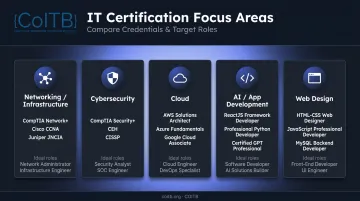
The main IT certification categories to consider:
| Focus Area | Common Credentials | Best For |
|---|---|---|
| Networking/Infrastructure | CompTIA A+, CCNA | Help desk, sysadmin, IT support roles |
| Cybersecurity | CompTIA Security+ | Security analyst, SOC roles |
| Cloud | AWS Cloud Practitioner, Azure Fundamentals | Cloud engineering, DevOps |
| AI/Application Development | GPT Professional, Python, ReactJS | Software dev, AI practitioner, full-stack |
| Web Design | HTML-CSS Web Designer | Freelance, front-end, junior design roles |
For candidates targeting modern software and AI roles, certifications in HTML, CSS, JavaScript, React, Python, and generative AI are increasingly sought after — and these skills map directly to where hiring demand is growing. Generative AI skill mentions grew 6,477% in 2023 across 15 labor markets, according to Lightcast's Digital Skills Outlook.
COITB's certification catalog covers this modern tech stack specifically — seven credentials across web design, JavaScript, React, Python, MySQL, GPT/AI, and technical sales, all accessible to candidates with 0–6 months of hands-on experience and no formal prerequisites.
Step 3: Prepare for the Exam
Preparation comes down to one rule: anchor everything to the official exam objectives. The certification provider's published exam outline is the single most important document you'll use. It tells you exactly what will be tested, how questions are weighted by domain, and where to focus your study time.
Two main study approaches:
- Self-study — Online courses, YouTube tutorials, textbooks, and practice exams. Flexible and cost-effective. Works well for disciplined learners with a clear exam blueprint
- Structured training — Bootcamps, prep courses, or coaching programs. Better for candidates who benefit from accountability and guided pacing
CompTIA recommends 9–12 months of hands-on experience before sitting for the A+ exam — though that reflects experiential readiness, not a mandatory study minimum. For entry-level certifications in modern development (HTML, CSS, React, Python), candidates regularly prepare in weeks with some foundational exposure already in place.
Consistency matters more than cramming. Build a study schedule, track domain coverage, and take at least one full practice exam before your actual test date.
Step 4: Register and Take the Exam
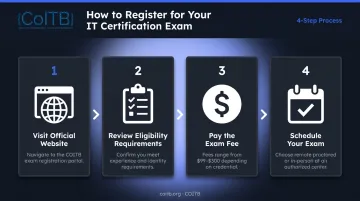
Once you've completed your preparation, the registration process is straightforward:
- Go to the certification provider's official website and find the exam registration page
- Review eligibility requirements — most entry-level exams have none, but confirm before purchasing
- Pay the exam fee — entry-level exams typically run $99–$125, while associate or mid-level exams range from $150–$300 (fees vary by provider and may include taxes)
- Schedule your exam — many providers now offer remote-proctored options, which means you can test from home with a webcam and stable internet connection
Major providers including AWS (via Pearson VUE), CompTIA, and Cisco all support online proctoring. COITB offers both remote proctoring and in-person testing at authorized test centers — remote exams accept military CAC and VA-issued IDs, which matters for veterans and active-duty service members.
On exam day: Bring valid government-issued ID, expect a mix of multiple-choice and scenario-based questions, and review the exam format beforehand so the structure isn't a surprise. Most entry-level exams run 75–90 minutes.
Step 5: Earn Your Credential, Update Your Profile, and Plan for Renewal
Passing the exam is the milestone — what happens next determines whether it actually moves your career.
Immediately after passing:
- Add the certification to your resume under a dedicated certifications section, including the issuing body and any credential ID or verification link
- Update your LinkedIn profile under Licenses & Certifications — include the badge URL so recruiters can verify it in one click
- Most providers issue a digital badge automatically upon passing. COITB badges are verifiable by employers, background-check vendors, and application portals independently
Plan for renewal from day one. Common renewal cycles:
| Provider | Validity Period |
|---|---|
| CompTIA (A+, Network+, Security+) | 3 years |
| AWS | 3 years |
| Cisco (most certifications) | 3 years |
| Microsoft Associate/Expert | Annual renewal required |
COITB certifications carry a defined validity period and require continuing education units (CEUs) for renewal — details are available in COITB's Recertification Requirement Policy. Track your expiration date immediately after passing; lapsed credentials are avoidable and costly to recover.
Earning your first certification often clarifies the next one. COITB recommends a logical stacking sequence — HTML-CSS Web Designer → JavaScript Professional Developer → ReactJS Framework Developer, for example — so your credential stack builds toward a specific career outcome rather than accumulating randomly.
How to Choose the Right IT Certification for You
Start with three filters:
- Career goal — What specific job title or domain are you targeting?
- Experience level — Where are you starting from? Zero background, some self-study, or existing professional experience?
- Market demand — Which credentials are employers in your target field actually listing?
A quick comparison by focus area:
- AI/application development — Fastest-growing skill demand in the market; certifications in React, Python, and GPT map directly to product and engineering roles
- Technical sales — High-compensation entry point ($120K–$300K+ total comp for sales engineers); often overlooked but a strong fit for career changers from non-tech sales
- Cloud — High candidate interest; solid employer demand at associate level and above
- Networking/cybersecurity — Strong posting demand; cybersecurity logged 514,359 U.S. job listings from May 2024–April 2025 per CyberSeek
That comparison points to a common mistake: choosing a certification because it sounds impressive rather than because it fits your target role. The most recognized credential isn't always the most relevant one. If you're targeting front-end developer roles, a React certification will carry more weight with hiring managers than a broad foundational credential in an unrelated domain.
Common Mistakes to Avoid When Pursuing IT Certifications
Even candidates who follow the right steps can lose time and money to a few predictable missteps. Watch for these three:
- Ignoring the exam objectives — Studying broad topic areas without anchoring to the provider's published exam blueprint wastes time and misses tested content. Download the official objectives first; build your study plan around them.
- Underestimating the time commitment — These exams test practical application, not just memorization. Skipping practice tests or rushing prep leads to retakes — which cost the same as the original exam fee, plus the time lost.
- Choosing certifications out of sequence — Pursuing an advanced credential without foundational knowledge creates gaps that hurt both exam performance and on-the-job effectiveness. Start with entry-level, no-prerequisite credentials and build progressively.

For COITB's certification stack, that means completing HTML-CSS Web Designer before attempting ReactJS Framework Developer. React is a JavaScript framework — attempting it without web fundamentals makes the exam significantly harder than it needs to be.
Frequently Asked Questions
What's the best IT certification to get?
The best certification depends on your target role and current experience. For web design and front-end roles, credentials like HTML-CSS Web Designer or ReactJS Framework Developer are a strong fit. For AI-focused or tech-adjacent roles, the Certified GPT Professional or Technical Sales Specialist align better. Match the credential to the job, not the other way around.
Is it hard to get an IT certification?
Entry-level certifications are accessible without prior experience, but they require focused preparation. With a structured study plan and consistent effort, most motivated candidates can pass within a few months — especially when study is guided by the official exam objectives.
What is the quickest IT certification to get?
Foundational certifications with no prerequisites and shorter exam formats can be earned in weeks with focused study. COITB's Certified GPT Professional, for example, is 60 questions in 75 minutes and is explicitly designed for candidates with minimal prior AI experience — including zero months of hands-on background.
Do I need a college degree to earn an IT certification?
No. Most IT certifications, especially at the entry level, have no degree requirement. That's why they've become a preferred credential path for career changers, bootcamp graduates, and self-taught candidates who want employer-verifiable proof of their skills.
How much does an IT certification exam typically cost?
Entry-level exams generally run $99–$125 per exam, though fees vary by provider, region, and applicable taxes — check the provider's official page before budgeting. For COITB's specific pricing, contact support@coitb.org or call +1 877 402 0840.
How long does it take to prepare for an IT certification exam?
For most entry-level certifications, candidates with little background need several weeks to a few months of consistent study. Those with prior hands-on experience often prepare faster, so taking a practice assessment before registering helps you set a realistic timeline.