Introduction
The tech job market is packed with certifications, and for beginners, that's part of the problem. Which ones actually matter to employers? And which ones are worth pursuing without a degree or prior experience?
IT certifications solve a real problem: they give employers a verifiable, standardized way to assess job-ready skills. For career changers, bootcamp graduates, and self-taught learners, that signal carries real weight.
This guide covers the top beginner IT certifications across four tracks — front-end web development, application development, backend and data, and AI — so you can match the right credential to your actual career goal rather than chasing a generic "best" list.
Key Takeaways
- IT certifications validate job-ready skills without requiring a college degree
- Entry-level options span multiple tracks: IT support, cybersecurity, and software/AI development — with credentials like COITB covering web, React, Python, and GPT skills
- Most beginner certifications require no prior experience and take 3–6 months of part-time study
- Choose based on your target career path — not generic rankings
- Credentials aligned to ISO/IEC 17024 carry stronger weight with employers than unaccredited alternatives
Why IT Certifications Matter for Beginners
Before choosing a certification, it helps to understand what you're actually earning.
A certificate confirms you completed a training program (for example, the Google IT Support Professional Certificate on Coursera). A certification means you passed a standardized exam that validates specific skills against industry benchmarks — think CompTIA A+ or a web development credential like COITB's HTML-CSS Web Designer Certification. Both have value, but certifications carry stronger employer recognition because they're independently assessed.
The Numbers Behind the Decision
The salary and growth data make a clear case for getting certified:
- Computer support specialists earn a 2024 median pay of $61,550, with 5% projected growth through 2034 — and the typical entry education is "some college, no degree"
- Information security analysts earn a 2024 median pay of $124,910, with 29% projected growth through 2034
Those numbers represent two distinct tracks with different entry requirements. IT support is the clearest bridge for true beginners. Web development and AI roles sit closer to cybersecurity on the compensation curve — but they're accessible from day one if you start with the right credential and build deliberately from there.
Why Certifications Matter for Non-Traditional Candidates
For career changers, self-taught learners, and bootcamp graduates, certifications do something a degree would take years to accomplish: they provide a credible, third-party signal that you can actually do the work. Employers can verify a credential against a published standard — self-described skills on a résumé offer no such assurance.
That's why certifications carry particular weight for candidates who can't point to a four-year CS degree. A third-party credential closes that gap faster than almost any other option:
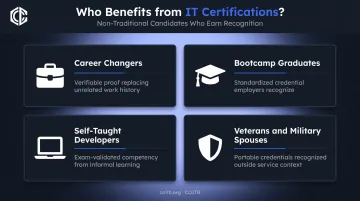
- Career changers get a verifiable proof point that replaces years of unrelated work history
- Bootcamp graduates translate intensive training into a standardized credential employers recognize
- Self-taught developers convert informal learning into documented, exam-validated competency
- Veterans and military spouses gain portable credentials recognized outside the service branch context
Best IT Certifications for Beginners
The certifications below were selected based on employer recognition, accessibility for true beginners, alignment with real job roles, and coverage of the most in-demand IT tracks today.
CompTIA Tech+
Best for: Absolute beginners exploring tech before committing to a career track.
CompTIA Tech+ (formerly ITF+) is the starting point for people who want to confirm foundational IT literacy before choosing a direction. It's vendor-neutral, has no prerequisites, and covers core concepts including basic security, infrastructure, and data management.
| Spec | Detail |
|---|---|
| Exam Code | FC0-U71 |
| Questions | 70 maximum |
| Time | 60 minutes |
| Passing Score | 650 / 900 |
| Prior Experience | None required |
Pricing: Check the CompTIA Store directly before registering, as exam prices update regularly. Recent store extractions showed pricing around $138–$139 per voucher.
Tech+ works well for students, non-technical professionals moving into tech-adjacent roles, and anyone unsure which IT track fits them. It's not a hiring credential on its own, but it builds the confidence and context you need before tackling A+ or Security+.
CompTIA A+
Best for: Beginners targeting IT support, help desk, or desktop support roles.
CompTIA A+ has been the industry standard for entry-level IT support for over two decades. It requires passing two exams — Core 1 and Core 2 — which test breadth across hardware, operating systems, networking basics, cybersecurity fundamentals, and cloud concepts.
| Spec | Detail |
|---|---|
| Exam Codes | 220-1201 (Core 1), 220-1202 (Core 2) — V15, launched March 2025 |
| Questions | 90 maximum per exam |
| Time | 90 minutes per exam |
| Passing Score | Core 1: 675 / 900; Core 2: 700 / 900 |
| Question Formats | Multiple-choice, drag-and-drop, performance-based |
| Recommended Experience | 12 months in an IT support role |
| Target Roles | IT support specialist, help desk technician |
Pricing: Store extractions showed approximately $246–$253 per exam voucher. Since you need two exams, budget accordingly — and confirm current pricing at the CompTIA Store before purchasing.
Note: Core 1 and Core 2 must be taken from the same version. Don't mix V15 exams with older series codes.
CompTIA recommends 12 months of hands-on support experience before attempting A+. Most self-studiers without that background spend 3–6 months preparing before feeling exam-ready.
Google IT Support Professional Certificate
Best for: Beginners wanting a structured, guided introduction to IT support before pursuing A+.
The Google IT Support Professional Certificate is a self-paced program on Coursera that covers troubleshooting, networking, operating systems, and security fundamentals. It's not a standardized certification exam — it's a completion-based certificate program, but it's useful as an on-ramp.
| Spec | Detail |
|---|---|
| Platform | Coursera |
| Cost | $49/month (USD) after 7-day free trial; financial aid available |
| Completion Time | Approximately 6 months at ~10 hours/week |
| Assessment Type | Course completion certificate (not a standardized exam) |
| Target Roles | IT support specialist, help desk technician |
| A+ Connection | Coursera states the program prepares learners for CompTIA A+ exams |
This is a solid first step for complete beginners who want guided instruction before sitting a proctored exam. Use it to build a foundation — then follow it with A+ to earn the credential employers actually hire against.
CompTIA Security+
Best for: Beginners targeting cybersecurity roles after building foundational IT knowledge.
Security+ is the go-to entry point for the cybersecurity track. It's required or preferred for a wide range of government and enterprise security positions, and CompTIA states it aligns with DoD 8140 work roles — making it essential for federal IT security pathways.
| Spec | Detail |
|---|---|
| Exam Code | SY0-701 |
| Questions | 90 maximum |
| Time | 90 minutes |
| Passing Score | 750 / 900 |
| Recommended Experience | CompTIA Network+ plus 2 years in security or systems administration |
| Target Roles | Cyber defense analyst, incident responder, vulnerability analyst, system administrator |
| Price | Approximately $404 per voucher (verify at CompTIA Store) |
Security+ sits higher in the beginner stack than many guides acknowledge. CompTIA recommends Network+ and two years of security experience before attempting it — candidates who skip A+ and jump straight to Security+ often struggle with the material's breadth. It's an excellent next-step credential once you have the foundation, not the place to start.
COITB Certifications in Web Development and AI
Best for: Beginners targeting software development, front-end engineering, or AI/GPT roles.
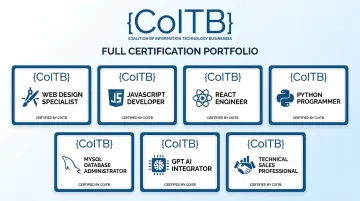
COITB is a non-profit credentialing body offering ISO/IEC 17024-aligned certifications in modern technology skills. Where CompTIA focuses on IT support and infrastructure, COITB validates skills in the specific languages and frameworks employers hire for in software development, UI design, and AI roles — HTML, CSS, JavaScript, React, Python, MySQL, and GPT.
The full COITB credential portfolio:
| Certification | Target Role | Exam Questions | Time | Passing Score |
|---|---|---|---|---|
| ReactJS Framework Developer | Front-end / full-stack developer | 90 | 90 min | 73% |
| HTML-CSS Web Designer | Web designer, junior front-end developer | 90 | 90 min | 75% |
| JavaScript Professional Developer | Front-end / full-stack developer | 90 | 90 min | 73% |
| Professional Python Developer | Back-end developer, AI/ML practitioner | 58 | 75 min | 70% |
| MySQL Backend Developer | Back-end developer, DBA | 90 | 90 min | 70% |
| Certified GPT Professional | AI practitioner, prompt engineer, ML engineer | 60 | 75 min | 71% |
| Technical Sales Specialist | Sales engineer, SaaS AE, pre-sales consultant | 60 | 75 min | 70% |
What makes COITB different for beginners:
- Designed for candidates with 0–6 months of hands-on experience — no formal prerequisites or degree requirements
- Remote online proctoring available 24/7 (webcam + stable internet); military CAC and VA-issued ID accepted
- Also available at authorized in-person test centers
- Digital badges issued upon passing — verifiable on LinkedIn, résumés, and employer portals
- Free practice assessment at coitb.org/assessment before committing to exam fees
Common credential stacking paths:
- Front-end developer: HTML-CSS Web Designer → ReactJS Framework Developer
- Full-stack developer: HTML-CSS → JavaScript → ReactJS → MySQL
- AI practitioner: Certified GPT Professional + Professional Python Developer
- Back-end developer: Professional Python Developer → MySQL Backend Developer
COITB and CompTIA A+ don't compete — they serve different career paths entirely. A+ leads to IT support and infrastructure roles; COITB leads to software development and AI roles. The employers, job titles, and day-to-day work are distinct.
For current exam pricing, contact COITB at support@coitb.org or +1 877 402 0840. Enterprise and bulk pricing is available for teams.
How to Choose the Right IT Certification for Your Goals
The single most important step: identify your target career track before selecting a certification. Pursuing the wrong path doesn't just waste money; it costs months of preparation time you won't get back.
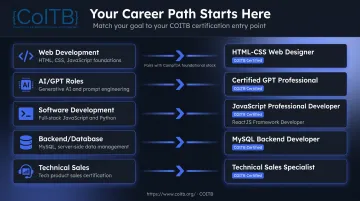
Match Certification to Career Path
| Target Career | Starting Certification |
|---|---|
| Web development / front-end | COITB HTML-CSS Web Designer → ReactJS Framework Developer |
| AI / GPT roles | COITB Certified GPT Professional (+ Python) |
| Software development | COITB JavaScript or Python → stack from there |
| Backend / database work | COITB Professional Python Developer → MySQL Backend Developer |
| Technical sales / sales engineering | COITB Technical Sales Specialist |
Three Practical Factors Beginners Often Overlook
Job postings are your best research tool. Search current listings for your target role and note which certifications appear repeatedly. That direct market feedback tells you more than any curated ranking list.
Total cost isn't just the exam voucher. Factor in study materials, practice exam subscriptions, and potential retake fees. Some vendor exams run $400+ per attempt with separate fees for each module. Know the full cost before you commit.
Credential quality standards matter. Certifications aligned to ISO/IEC 17024 (the international standard for personnel credentialing bodies) signal that the process follows a defined, auditable quality framework. That's worth verifying before investing time in any credential.
How to Prepare for and Pass Your IT Certification Exam
Build a Study Plan That Works
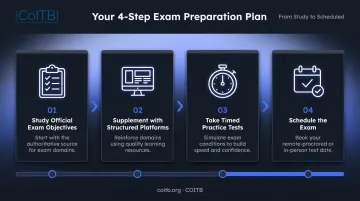
Consistent daily study over 8–12 weeks beats cramming every time. A practical approach:
- Start with official exam objectives — the credential body's published exam blueprint tells you exactly what topics will be tested, so map your study directly to it
- Supplement with structured platforms — Coursera, Udemy, freeCodeCamp, and MDN Web Docs fill knowledge gaps across web development, AI, and technical sales domains
- Take timed practice tests under real exam conditions at least 2–3 weeks before your scheduled date — this reveals knowledge gaps and reduces test-day anxiety
- Schedule the exam once you're consistently scoring above the passing threshold on practice tests — having a date creates accountability
Community Resources Worth Using
- r/ITCareerQuestions — 163K+ members discussing entry-level IT career paths and cert strategies
- r/learnprogramming and r/webdev — active communities covering JavaScript, React, Python, and HTML/CSS questions
- r/artificial and AI-focused Discord servers — useful for candidates preparing for GPT and AI credentials
- Domain-specific Discord study groups for the credential you're targeting
These communities surface real exam insights from recent test-takers that you won't find in official study materials. Once you're ready to test, COITB exams are available online with flexible remote proctoring — no need to travel to a test center.
Conclusion
The best IT certification for a beginner isn't a universal answer — it depends on where you're headed. IT support leads to CompTIA A+. Cybersecurity leads to Security+ after foundational skills. Web development and AI roles have a dedicated track through COITB's credential portfolio, which covers the technologies — React, JavaScript, Python, MySQL, and GPT — that traditional IT certifications simply don't address.
The IT job market moves fast, and employers consistently favor candidates who can demonstrate verified, hands-on skills — not just self-reported experience. Your first certification is the credential that makes that case for you.
If you're targeting web development, front-end engineering, or AI roles, explore COITB's full certification portfolio at coitb.org or reach out directly at support@coitb.org.
Frequently Asked Questions
What is the best IT certification for a beginner?
It depends on your target career path. For web development and software roles, COITB credentials — including HTML-CSS Web Designer, ReactJS Framework Developer, JavaScript Professional Developer, and Certified GPT Professional — are designed for beginners with no prior experience required to sit the exam. For IT support and help desk roles, CompTIA A+ is the traditional entry point. Most entry-level certifications across both paths are accessible without a technical background.
Can I get an IT job with just a certificate?
Certifications demonstrate job-ready skills to employers, but hiring decisions also factor in hands-on experience and portfolio work. They're most effective when paired with practical projects — a GitHub portfolio, freelance work, or a bootcamp capstone.
What is the difference between a certificate and a certification in IT?
A certificate confirms you completed a training program (such as Google IT Support on Coursera). A certification requires passing a standardized exam that validates specific skills against industry benchmarks — for example, CompTIA A+ or a COITB credential. Certifications carry stronger employer recognition because they're independently assessed.
How long does it take to get an IT certification as a beginner?
Most entry-level certifications take 3–6 months of part-time study to prepare for. CompTIA Tech+ and some COITB credentials may be achievable faster, depending on how much hands-on experience you already have.
Do I need a college degree to pursue IT certifications?
No. Most IT certifications have no degree requirement — they're specifically designed to validate skills independently of formal education. COITB credentials, for instance, are open to career changers, veterans, and self-taught learners regardless of academic background.