The challenge is that "free responsive web design certification" covers a wide range of options. Some lead to a meaningful, shareable credential. Others deliver a completion badge after watching videos — which carries little weight with hiring managers focused on demonstrated output.
This guide covers what a responsive web design certification actually is, which free courses genuinely deliver value, what skills they build, and how to pair free learning with a credential that holds up in the hiring market.
Key Takeaways
- Mobile-first is the standard — responsive design is now a baseline front-end skill, not an advanced specialization
- freeCodeCamp's RWD certification is the most rigorous free option, combining projects, module quizzes, and a 50-question closed-book exam
- Project output matters more than badges — employers and hiring managers prioritize demonstrated work over passive course completions
- Free credentials build skills, but employer-verifiable certifications — like COITB's HTML-CSS Web Designer Certification — add the third-party validation layer that hiring managers can independently confirm
- The BLS projects 7% growth for web developer roles through 2034, with roughly 14,500 openings per year
What Is a Responsive Web Design Certification?
Responsive web design is the practice of building websites that automatically adapt their layout, content, and functionality to any screen size — phones, tablets, desktops — using fluid grids, flexible images, and CSS media queries. MDN describes it as a design philosophy built into the web platform itself — not a bolt-on framework or separate technology stack.
A responsive web design certification is a credential that confirms a learner has demonstrated proficiency in the core front-end technologies used to build those interfaces, primarily HTML, CSS, Flexbox, CSS Grid, and media queries.
Not all credentials carry equal weight, and that gap matters when you're submitting a résumé. Here's how the main types compare:
Course Badge vs. Verified Certification
| Credential Type | How It's Earned | Employer Signal |
|---|---|---|
| Completion badge | Watch videos, pass short quizzes | Low — shows engagement, not demonstrated skill |
| Project-based certificate | Build and submit real projects | Moderate — shows applied output |
| Proctored certification | Pass a timed, closed-book exam | Higher — independently verified competency |
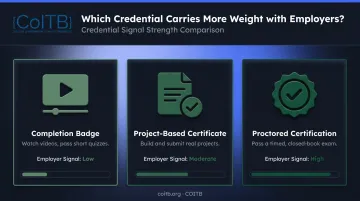
Employer recognition comes down to how a credential was earned. A proctored exam — like COITB's HTML-CSS Web Designer Certification — signals independently verified skill in a way that a completion badge simply cannot.
Core Skills You'll Learn in a Responsive Web Design Course
The best RWD programs follow a logical skill progression — each concept directly supports the next. Here's what that sequence looks like in practice.
Semantic HTML
Semantic HTML means using the right tags for the right content: <header>, <nav>, <main>, <section>, <article>, <footer>. It's not just about structure — it directly affects accessibility (screen readers rely on it) and search engine readability. Everything else in responsive design builds on well-structured markup.
CSS Fundamentals
Before any layout work, you need to understand how CSS controls presentation: selectors, the box model, positioning, specificity, and color systems. The box model — content, padding, border, margin — governs how elements occupy space on screen and is foundational to layout debugging.
CSS Flexbox and CSS Grid
These two layout systems do most of the heavy lifting in modern responsive design:
- Flexbox — a one-dimensional layout model; ideal for navigation bars, card rows, and vertically centered UI components
- CSS Grid — a two-dimensional system controlling both rows and columns simultaneously; powers complex page layouts and dashboard-style designs
Media Queries and Breakpoints
Media queries are the mechanism that makes a design responsive. They apply different CSS rules based on a device's screen width, so a layout can shift from a single-column mobile view to a multi-column desktop layout at defined breakpoints. Common breakpoints sit around 480px (mobile), 768px (tablet), and 1200px (desktop) — though mobile-first design means you write base styles for small screens and layer up from there.
Web Accessibility Principles
Modern RWD curricula increasingly cover accessibility — and employers building inclusive products now expect developers to understand it. W3C defines web accessibility as designing so people with disabilities can use the web. Core topics include:
- Contrast ratios that meet WCAG minimum thresholds
- ARIA labels for screen reader compatibility
- Keyboard navigation support
- WCAG 2.1 compliance at the AA level
Top Free Responsive Web Design Certification Courses
A handful of platforms offer free or freely auditable RWD programs. "Free" means different things on each — some platforms offer entirely free verified credentials, others offer free content but charge for the certificate.
freeCodeCamp Responsive Web Design Certification
freeCodeCamp's current RWD certification, launched December 2, 2025, is the most comprehensive free option available. Its curriculum covers:
- Semantic HTML and forms
- CSS basics and accessibility
- CSS Flexbox and CSS Grid
- Responsive design principles
The course is entirely self-paced and project-based, with lessons, workshops, labs, quizzes, and review content built into each module.
How certification is earned:
- Complete five required HTML certification projects
- Pass each module's 20-question quiz (18 correct required)
- Pass the final 50-question closed-book, timed exam (one attempt per 168 hours; retakes allowed)
- Receive a free, shareable certificate — addable to LinkedIn
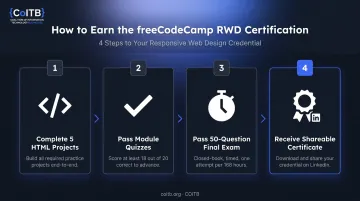
The timed, closed-book exam structure sets freeCodeCamp apart from completion-only badges. It introduces genuine assessment accountability. The certification contains hundreds of hours of content, though no specific hour count is currently published.
The Odin Project
The Odin Project is a free, open-source web development curriculum with a Foundations path covering responsive HTML/CSS and a Full Stack JavaScript track. It emphasizes building real projects from scratch with minimal hand-holding, which develops stronger independent problem-solving skills than guided walkthroughs.
The Odin Project does not issue a completion certificate. Its value is portfolio depth and genuine skill development. For learners who need a shareable credential for LinkedIn or job applications, that's a meaningful limitation. For building actual competency, it's one of the strongest free options available.
Other Platforms Worth Exploring
- Coursera — In August 2025, Coursera replaced its general audit option with a one-module free preview. Some courses (including the University of London's Responsive Web Design course) still advertise audit access — but verify on the individual course page. Free access does not include the certificate.
- Scrimba — Offers a free Learn HTML and CSS course with 5.7 hours of content, 75+ coding challenges, and five projects. Much shorter than freeCodeCamp but more interactive, and lists a completion certificate.
- MDN Web Docs — The authoritative reference for HTML and CSS standards. Not a certification program, but essential as a companion resource while learning any of the above.
Once you've built skills through any of these platforms, the next step is validating them with a recognized credential. COITB's HTML-CSS Web Designer Certification is designed specifically for self-taught developers and bootcamp graduates who want a third-party, proctored exam to demonstrate job-ready proficiency — without re-doing coursework they've already completed.
How to Choose the Right Free RWD Certification for You
The right choice depends on your learning style, career goals, and what you need the credential to actually do.
Match Format to Learning Style
- freeCodeCamp — best for structured, exam-oriented learners who want a verified, free credential they can share immediately
- The Odin Project — best for learners who prefer open-ended project building and aren't focused on getting a certificate
- Coursera — suits those who want university-style video lectures; be aware that the free tier likely won't include a certificate
Evaluate What the Credential Actually Proves
Look for programs that require hands-on project completion, not just video consumption. The BLS notes that web development candidates may demonstrate ability through projects or prior work even when a specific education credential isn't required. A project portfolio signals real output; passive course completion alone does not.
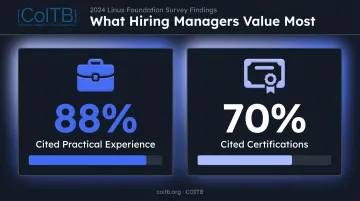
A 2024 Linux Foundation survey of hiring managers found that 88% cited practical experience as a hiring factor, compared to 70% who cited certifications. Both matter, and neither substitutes for the other.
Check Shareability and Recognizability
Once you've confirmed a program requires real project work, the next question is whether that credential travels well. Before committing, confirm:
- Can the certificate be shared as a LinkedIn badge or verifiable link?
- Is the issuing organization recognizable to employers in your target market?
- Does the credential reflect project completion, an exam, or both?
A credential that can't be verified or linked gives recruiters nothing to act on — even if you earned it legitimately.
Turning Free Certification Into a Recognized Career Credential
Free certifications are a strong starting point. They build real skills, produce portfolio work, and demonstrate initiative. But they have a ceiling.
For mid-to-senior hiring, many employers look for credentials validated through a standardized, proctored process. Free course badges — even from reputable platforms — are typically self-reported. There's no independent third-party verification that the named person actually passed a closed exam under controlled conditions.
The Gap Free Credentials Leave
Self-taught developers and bootcamp graduates often face the same problem: their skills are real, but their résumés don't have a verifiable third-party signal. A portfolio helps, but it requires a hiring manager to evaluate the work. A proctored credential provides an independent, employer-verifiable data point.
Where COITB's HTML-CSS Web Designer Certification Fits
For learners who have completed a free RWD course and want to add a credential that carries real employer weight, COITB's HTML-CSS Web Designer Certification is a natural next step. It's explicitly designed for candidates with 0–6 months of hands-on experience — exactly the profile of someone who has just completed freeCodeCamp or The Odin Project.
The exam covers the same skills these free courses teach:
| Domain | Exam Weight |
|---|---|
| CSS Styling & Layout | 25% |
| HTML Structure | 20% |
| Responsive Design | 20% |
| Accessibility & Semantics | 20% |
| Performance & Best Practices | 10% |
| Advanced Features | 5% |
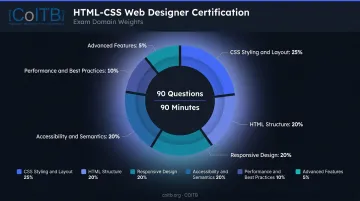
The format: 90 questions, 90 minutes, 75% passing score — multiple-choice and scenario-based items, delivered online via remote proctor or in-person at an authorized test center. No prerequisites required. Eligibility is open to self-taught developers, bootcamp graduates, and career changers regardless of background.
COITB's certifications are aligned to ISO/IEC 17024 standards, the internationally recognized framework for personnel certification bodies. Its Internal Audit Policy documents ongoing compliance with this standard.
One structural distinction: COITB does not deliver training or bootcamps. That separation is what ISO/IEC 17024 requires to maintain impartiality — and it's what makes the credential independently trustworthy.
On passing, candidates receive a digital badge shareable to LinkedIn, résumés, and employer verification portals — with a verifiable URL that lets hiring managers authenticate the credential independently, without contacting COITB directly.
The practical path forward:
- Complete a free RWD course to build skills and portfolio projects
- Sit the COITB exam to pair that work with an employer-verifiable credential
- Share the digital badge alongside your portfolio — hiring managers get a verified signal without having to evaluate your code themselves
Portfolio output plus a proctored, third-party certification sends a clear message: the skills are real and independently confirmed.
To gauge readiness before registering, take the free practice assessment at coitb.org/assessment. For exam details and current pricing, contact COITB at support@coitb.org or +1 877 402 0840.
Frequently Asked Questions
What is responsive web design certification?
A responsive web design certification is a credential confirming a developer can build websites that adapt to any screen size using HTML, CSS, Flexbox, CSS Grid, and media queries. Formats range from project-based programs (like freeCodeCamp) to proctored exams (like COITB's HTML-CSS Web Designer Certification), each carrying different levels of employer verifiability.
Is responsive web design hard to learn?
The learning curve is moderate. HTML and basic CSS are beginner-friendly, but mastering Flexbox, Grid, and breakpoint logic takes consistent practice — fluency develops through building real projects, not just reading. Most learners grasp the core fundamentals within a few weeks of daily study.
How long does it take to learn responsive web design?
Basic proficiency typically takes 1–3 months of regular study. freeCodeCamp's RWD certification contains hundreds of hours of content, though prior experience with HTML/CSS shortens the timeline considerably.
Is a free responsive web design certification worth it for my career?
Free certifications build skills and demonstrate initiative, especially when paired with a strong project portfolio. For greater employer recognition, consider following up with a proctored, industry-aligned credential — such as COITB's HTML-CSS Web Designer Certification, which uses remote proctoring and aligns to ISO/IEC 17024 standards.
What jobs can I get with a responsive web design certification?
Common entry-level roles include front-end developer, UI developer, junior web developer, and web designer. The skills also apply to email developer, WordPress developer, and UX engineer roles. The BLS projects 7% growth for web developers and digital designers through 2034, with roughly 14,500 annual openings — and O*NET data shows CSS appears in 33% and HTML in 26% of current web developer job postings.