The catch? A self-reported skill and a verified credential are not the same thing in a hiring manager's eyes.
This article explains exactly what an HTML certification exam is, what it tests, who it's for, and how to prepare — whether you're a student starting out or a working professional formalizing existing skills.
Key Takeaways
- HTML certifications range from free course badges to proctored, professionally governed exams — and the credential type affects how employers view it
- BLS reports 14,500 annual openings for web developers and digital designers through 2034, with median pay up to $98,090
- Exam blueprints typically cover HTML structure, semantic elements, forms, media, accessibility, and responsive design
- COITB's HTML-CSS Web Designer exam is 90 questions, 90 minutes, with a 75% passing score requirement
- Career changers, bootcamp graduates, and self-taught developers use third-party credentials to prove job-ready skills to employers who didn't see them in a classroom
What Is an HTML Certification Exam?
An HTML certification exam is a structured, proctored or online assessment that tests your ability to understand and apply HTML concepts — from document structure and semantic markup to forms, media embedding, and HTML5 features — and results in an official, verifiable credential.
That credential type matters. Two categories exist:
- Course completion certificates — awarded for finishing a course, regardless of whether you actually understood the material
- Skills-based certification exams — awarded after demonstrating measurable competency against a defined standard, independent of any specific training program
The Institute for Credentialing Excellence draws this distinction: a certification assesses previously acquired competence independently of a learning event, while a certificate follows instruction and measures mastery of that specific program's outcomes. The certification carries more professional weight because it's outcome-based, not attendance-based.
Knowing what separates a real certification from a course certificate is step one. Step two is choosing the right exam for your goals.
HTML certifications vary by provider and level. Some are beginner-focused and free — W3Schools offers an HTML-only adaptive exam. Others combine HTML with CSS and are structured against ISO/IEC 17024, the international standard for personnel certification bodies. The right choice depends on whether you need a quick skills check or a credential that holds up under employer scrutiny.
Why Pursue an HTML Certification? Career Benefits for Students and Professionals
A portfolio shows your work. A certification verifies your skills through a defined standard — assessed by a third party, not self-reported on a résumé.
For Students and Bootcamp Graduates
Students finishing computer science programs, coding bootcamps, or self-study tracks face a common problem: everyone else graduating alongside them completed the same coursework. An HTML certification provides external validation that your skills meet a defined standard, not just your instructor's internal rubric.
According to the Stack Overflow 2024 Developer Survey, 82% of developers used online resources to learn and only 49% learned to code at school — meaning the majority of developers in the workforce are demonstrating skills through non-traditional paths. A recognized credential helps those candidates stand out.
For Working Professionals
Experienced web designers and front-end developers who've been using HTML on the job without formal credentials can use a certification to officially document existing skills — useful when pursuing new roles, freelance clients, or promotions where demonstrated competency is a requirement.
For Career Changers
The BLS reports the combined web developers and digital interface designers group at 214,900 jobs in 2024, with 14,500 projected annual openings through 2034 and median pay of $90,930 to $98,090. For professionals entering this field from marketing, healthcare, business operations, or other non-tech backgrounds, an HTML certification is a concrete first credential that signals readiness to employers who can't otherwise verify skills.
The Credential Ladder
HTML certification is the first step, not the finish line. Most professionals use it to build toward:
- CSS and full web design credentials
- JavaScript and front-end development certifications
- React framework credentials for application development
- Backend and database certifications (Python, MySQL)
Each credential documents a distinct, assessed skill — building a verifiable track record that deepens over time.
What Does an HTML Certification Exam Cover?
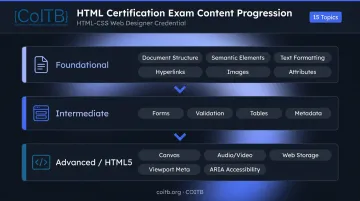
Most HTML certification exams test a predictable set of topic domains — even when providers differ in name or format. Here's what to expect across foundational, intermediate, and advanced levels.
Foundational Topics
Every HTML certification covers these core areas:
- HTML document structure and DOCTYPE declarations
- Semantic HTML5 elements (
header,nav,section,article,footer) - Text formatting, lists, and content hierarchy
- Hyperlinks and navigation
- Images and multimedia embedding
- HTML attributes and their proper use
Intermediate-Level Content
Mid-level exams add:
- HTML forms and input types (text, email, checkbox, radio, select, textarea)
- Form validation attributes
- Tables and data presentation
- Metadata in the
<head>element
Advanced and HTML5-Specific Topics
Professional-level exams extend into:
- Canvas element basics
- Audio and video tags
- Web Storage API (localStorage and sessionStorage)
- Responsive design via the viewport meta tag
- Accessibility attributes — ARIA roles, semantic structure, alt text
Exam Format
Most HTML certification exams use multiple-choice questions testing conceptual knowledge, with some providers adding scenario-based items that require applying knowledge to real-world situations rather than just recalling definitions. Typical parameters across providers:
| Parameter | Typical Range |
|---|---|
| Number of questions | 35–90 items |
| Time limit | 50–90 minutes |
| Passing score | 70–75% |
| Format | Multiple-choice and/or scenario-based |
Download the official exam blueprint from your chosen provider before you start studying. Domain weights tell you exactly where to focus — so you're not spending 80% of your prep time on a topic worth 5% of the exam while under-preparing for domains worth 20–25%.
Who Should Get an HTML Certification?
Aspiring Web Developers and Students
Students and bootcamp graduates benefit most from an HTML certification as their first official tech credential. Without significant work experience on their résumé, it gives employers something concrete and verifiable to evaluate — not just a list of coursework and projects.
Working Professionals Seeking Validation
Experienced web designers and front-end developers who've built dozens of sites but never formally certified their skills can use a certification to document what they already know. This carries real weight when pursuing a raise, a new role, or a freelance client who wants verified proof of skill rather than a portfolio alone.
Career Changers Entering Technology
For those pivoting from a completely different field, an HTML certification provides a structured, assessable credential that self-study alone can't offer. Candidates with zero to six months of tech experience can use it to show employers they took an organized, assessed approach to learning — not just informal tutorials. Key advantages for career changers include:
- Demonstrates commitment to a structured learning path
- Provides a third-party verified credential employers can trust
- Signals job-readiness without years of industry experience
How to Prepare for Your HTML Certification Exam
Four focused steps cover most of what separates candidates who pass from those who don't.
Step 1: Get the Official Exam Blueprint
Download the specific exam objectives from your chosen provider before doing anything else. Study what the exam actually tests, not the entire breadth of HTML. This alone narrows your study scope and eliminates wasted time on topics the exam won't cover.
Step 2: Build Hands-On Practice
Reading documentation covers theory. HTML is best understood by writing it. Build small web pages that deliberately incorporate each domain from the exam outline — forms, semantic structure, media elements, responsive meta tags. The practice of building forces you to confront gaps that passive reading masks.
Step 3: Use Practice Tests Strategically
Practice exams simulate the actual testing environment, which reduces test-day anxiety. More importantly, reviewing wrong answers reveals specific knowledge gaps. A single thorough review of incorrect answers is more valuable than taking three more practice tests without analysis.
Step 4: Set Realistic Study Time
Preparation time depends on your starting point:
- COITB recommends 0–6 months of hands-on practice before sitting their HTML-CSS exam
- Pearson/Certiport targets candidates with approximately 150 hours of instruction and hands-on experience
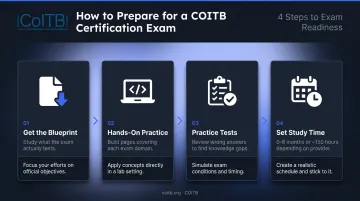
Tie each study session to a specific blueprint domain rather than studying HTML broadly — that's how you hit readiness within that window and walk into the exam prepared.
COITB HTML-CSS Web Designer Certification
COITB is a non-profit credentialing body whose certification programs are aligned to ISO/IEC 17024, the international standard for personnel certification bodies. That alignment means the credential is governed by defined standards for exam integrity, candidate rights, credential lifecycle management, and independent verifiability — with third-party verification built into the credential lifecycle.
About the Exam
The COITB HTML-CSS Web Designer Certification is a combined HTML and CSS credential — because the two technologies work together in every professional context. The exam:
- 90 questions, 90-minute time limit
- 75% passing score (68 of 90 questions correct)
- Multiple-choice and scenario-based format — no live coding
- Available via remote online proctoring or in-person at authorized test centers
- Accepts government-issued photo ID, including military CAC and VA-issued ID
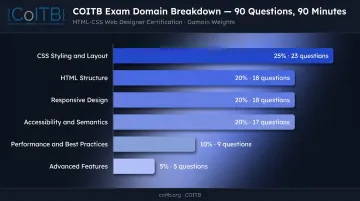
Domain Breakdown
| Domain | Weight | Questions |
|---|---|---|
| CSS Styling & Layout | 25% | 23 |
| HTML Structure | 20% | 18 |
| Responsive Design | 20% | 18 |
| Accessibility & Semantics | 20% | 17 |
| Performance & Best Practices | 10% | 9 |
| Advanced Features | 5% | 5 |
Who It's Built For
COITB's credential targets candidates with 0–6 months of hands-on experience — accessible for career changers, bootcamp graduates, and self-taught developers. Skills covered include:
COITB's credential targets candidates with 0–6 months of hands-on experience — accessible for career changers, bootcamp graduates, and self-taught developers. The exam validates:
- Semantic HTML5 structure and document hierarchy
- CSS3 properties, Flexbox, and CSS Grid layouts
- Responsive design with media queries
- WCAG accessibility fundamentals
Veterans and military spouses may be eligible to apply GI Bill, VET TEC, MyCAA, or VR&E benefits toward the exam — verify eligibility with VA/SAA before registering.
Credential Pathway
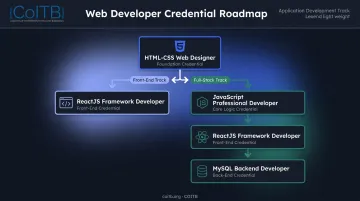
The HTML-CSS Web Designer certification opens into COITB's broader credential ecosystem. Common progression paths include:
- Front-end track: HTML-CSS Web Designer → ReactJS Framework Developer
- Full-stack track: HTML-CSS → JavaScript Professional Developer → ReactJS → MySQL Backend Developer
Take a free practice assessment at coitb.org/assessment to gauge readiness before registering, or contact COITB at support@coitb.org / +1 877 402 0840.
Frequently Asked Questions
Is there a certification for HTML?
Yes. Multiple organizations offer HTML certifications. W3Schools provides an HTML-only adaptive online exam, while Pearson/Certiport and COITB offer combined HTML-CSS exams aligned to professional standards. COITB's credential is developed as a non-profit body following ISO/IEC 17024 guidelines, with remote-proctored delivery and a digital badge on passing. Both beginners and experienced candidates will find a level that fits.
How do I get a free HTML certificate?
Free HTML certificates are available through platforms like W3Schools, freeCodeCamp, and W3Cx on edX. Most are course-completion badges rather than proctored exams, which means they carry less weight with employers than a verified credentialing exam.
Is HTML still used in 2026?
HTML remains the foundational markup language of every webpage and web application. The Stack Overflow 2024 Developer Survey reported HTML/CSS use by roughly 53% of respondents, and BLS projects 14,500 annual job openings for web developers and digital designers through 2034.
What topics are covered in an HTML certification exam?
Core domains typically include HTML document structure, semantic HTML5 elements, forms and input types, multimedia embedding, responsive design hooks, and accessibility (ARIA attributes, alt text, semantic structure). The exact scope and weighting depend on the provider and exam level.
How long does it take to prepare for an HTML certification exam?
It depends on your starting point. COITB recommends 0–6 months of hands-on practice; Pearson/Certiport targets candidates with approximately 150 hours of instruction and experience. Focused, blueprint-driven study reaches readiness faster than general, unstructured learning.
Does an HTML certification help you get a job?
A recognized certification provides objective, verifiable proof of skill. That third-party signal matters most for career changers, bootcamp graduates, and self-taught developers who need to stand out to hiring managers. COITB's HTML-CSS Web Designer credential is built specifically for that audience. It won't replace a portfolio, but it strengthens one.