Introduction
You've built nav bars, styled responsive layouts, and can spot a broken flexbox container at a glance. But when a recruiter asks, "Do you have any certifications?" — there's an awkward pause.
For self-taught developers, bootcamp graduates, and career changers, the gap between having a skill and proving it is a real obstacle. An HTML and CSS certification test closes it with a recognized, verifiable credential employers can check.
According to the U.S. Bureau of Labor Statistics, employment of web developers is projected to grow 7% between 2024 and 2034, with a median annual wage of $90,930 — and roughly 14,500 new openings per year. In that market, a verifiable credential gives hiring managers a concrete reason to move your application forward.
Here's what's ahead: exam structure, the HTML and CSS topics most likely to appear, a preparation framework, and test-day strategy.
Key Takeaways
- HTML and CSS certification exams test conceptual knowledge and real-world application in equal measure.
- The highest-yield study areas are semantic HTML, the CSS box model, selectors/specificity, Flexbox, and responsive design.
- A 2–4 week structured study plan with daily hands-on coding significantly outperforms passive review.
- Most HTML/CSS exams are fully remote — you need a webcam, stable internet, and a valid ID.
- A recognized credential gives employers verifiable proof of your skills, no matter how you learned them.
Why an HTML and CSS Certification Can Accelerate Your Tech Career
Self-taught developers and bootcamp graduates often have the skills — but no way to prove it to a hiring manager reviewing 80 applications in an afternoon. Without a CS degree or employer-verifiable work history, signaling competence is the real obstacle.
A proctored exam gives recruiters something they can actually verify — unlike a GitHub repo or a self-reported "proficient in HTML/CSS" on a résumé.
A course teaches skills. A certification exam — administered under controlled conditions against a defined blueprint — validates those skills to a recognized standard. Employers use that distinction as an initial screening signal for entry-level candidates, which is where the credential earns its weight.
Who Benefits Most
The credential is most valuable for:
- Self-taught developers from freeCodeCamp, The Odin Project, or MDN who need something verifiable beyond a portfolio
- Bootcamp graduates (General Assembly, Flatiron, Hack Reactor) who need third-party validation to complement their portfolio
- Career changers from marketing, design, education, or healthcare pivoting into web work
- Freelance web designers competing on Upwork or pitching directly to small businesses
- Veterans and military spouses leveraging education benefits to enter civilian tech — GI Bill, VET TEC, MyCAA, and VR&E funding pathways may apply (verify eligibility through VA/DoD before registering)
The HackerRank 2024 Developer Skills Report found that 56% of engineering managers say upskilling works or mostly works — a signal that a third-party credential can move your application past the first cut.
What to Expect on an HTML and CSS Online Certification Test
Exam Format and Structure
The COITB HTML-CSS Web Designer Certification gives you a clear picture of what a structured, credible exam looks like. It consists of 90 multiple-choice and scenario-based questions delivered in a 90-minute window, giving you roughly one minute per question. The passing threshold is 75%, meaning you need at least 68 correct answers to earn the credential.
The exam's domain breakdown:
| Domain | Weight | Questions |
|---|---|---|
| CSS Styling & Layout | 25% | 23 |
| HTML Structure | 20% | 18 |
| Responsive Design | 20% | 18 |
| Accessibility & Semantics | 20% | 17 |
| Performance & Best Practices | 10% | 9 |
| Advanced CSS Features | 5% | 5 |
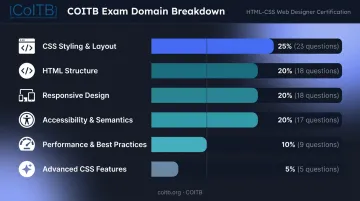
CSS-related content spans multiple domains and accounts for roughly 70% of the exam. Strong CSS fundamentals aren't optional — they're central to passing.
Question Types You'll See
- Syntax identification — selecting the correct element or attribute for a given use case
- Output prediction — reading a code snippet and choosing what it renders or how it behaves
- Debugging scenarios — identifying the error in broken HTML or CSS
- Best-practice selection — choosing the most semantically appropriate or accessible approach
Scenario-based items test applied understanding — expect questions where you diagnose broken layouts, choose accessible markup, or predict how a CSS rule cascades.
Remote Proctoring Requirements
The COITB exam is available fully online or at authorized test centers. For the remote option, you'll need:
- A desktop or laptop with a webcam and microphone
- A stable broadband connection (minimum 1 Mbps upload/download)
- A single monitor — disconnect any additional displays
- A private, quiet, well-lit workspace free of unauthorized materials
- A government-issued photo ID (driver's license, passport, military CAC, or VA-issued ID all accepted)
Run a system check 5–10 minutes before your scheduled session. Close all background applications before the exam begins.
HTML Topics You Need to Master Before Test Day
Document Structure
Every HTML exam starts here. Understand the DOCTYPE declaration, the role of <html>, <head>, and <body>, and how browsers parse a document into a DOM tree. Exam questions frequently test whether you know why elements belong where they do — not just where to put them.
Semantic HTML5 Elements
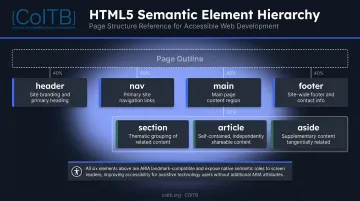
This is one of the most consistently tested areas. Know when to use:
<header>,<nav>,<main>,<footer>— page-level landmarks<section>,<article>,<aside>— content structure elements
Questions often ask you to distinguish between a generic <div> and the semantically correct element for a given scenario. The COITB exam explicitly tests this across both the HTML Structure and Accessibility & Semantics domains — together accounting for 40% of the exam. These same elements underpin accessibility — know how they support screen readers and keyboard navigation, and where ARIA attributes are needed to fill gaps in native semantics.
Forms and Validation
Forms earn their own dedicated domain on the COITB exam (10% of the total). Study:
<form>,<input>,<label>,<textarea>,<select>,<button>- Input types:
text,email,checkbox,radio,submit - Validation attributes:
required,pattern,minlength
A common exam trap: forgetting to associate <label> elements with their corresponding inputs using the for attribute.
Links and Images
Key attributes to know:
<a>—href(destination URL) andtarget(controls where the link opens)<img>—src(image path),alt(text description),width(display size)
The alt attribute appears frequently in accessibility-focused questions. It's a functional accessibility requirement — not optional filler.
CSS Concepts That Commonly Appear on Certification Tests
The CSS Box Model
Box model questions appear on almost every CSS exam. The four layers — content, padding, border, margin — and how they interact with element sizing are foundational.
Pay particular attention to box-sizing: border-box. By default, width in CSS applies only to the content area. With border-box, padding and border are included in that width — a behavior that removes unexpected sizing side effects and is now the industry default. Exam questions often test whether you understand which sizing model is active.
Selectors, Specificity, and the Cascade
The COITB exam's largest single domain (25%) covers this area. Know:
- Element, class, and ID selector weights
- How pseudo-classes (
:hover,:focus,:nth-child) and pseudo-elements (::before,::after) factor into specificity - How
!importantbehaves and why overusing it signals poor CSS architecture - Inheritance — which CSS properties cascade to children by default
When two rules conflict, specificity determines the winner — and the exam will ask you to calculate that outcome quickly.
Flexbox and CSS Grid
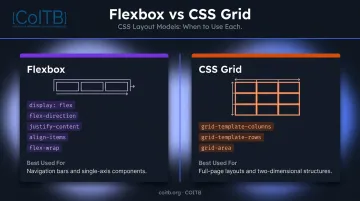
Both layout systems are explicitly tested across two domains on the COITB exam. For Flexbox:
display: flex,flex-direction,justify-content,align-items,flex-wrap- Understand the difference between main axis and cross axis alignment
For CSS Grid:
grid-template-columns,grid-template-rows,grid-area- When to use Grid (two-dimensional layouts) versus Flexbox (one-dimensional)
Build actual layouts with both systems. Hands-on practice is what makes the difference between recognizing a property name and knowing which one to reach for.
Responsive Design and Media Queries
Responsive design carries 20% of the exam weight. Focus on:
- Writing
@mediaqueries withmin-widthbreakpoints (mobile-first approach) - Relative units:
em,rem,%,vw,vh— and when to use each - The viewport meta tag:
<meta name="viewport" content="width=device-width, initial-scale=1"> - Fluid layouts that reflow gracefully across screen sizes
Mobile-first is how the industry builds — start with the smallest viewport and scale up, and that mental model will serve you on both the exam and the job.
How to Build a Winning Study Plan
Recommended Timeline: 2–4 Weeks
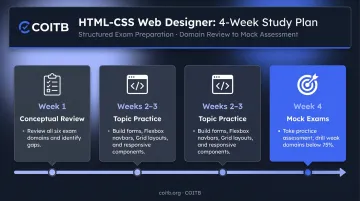
For candidates with some hands-on HTML/CSS experience, four weeks is enough. Structure it like this:
- Week 1 — Conceptual Review: Work through all six exam domains using the official COITB exam outline as your checklist. Identify gaps.
- Weeks 2–3 — Topic-by-Topic Practice: Build something for each concept. A form with validation. A Flexbox navigation bar. A two-column Grid layout with a sidebar. A responsive card component with media queries.
- Week 4 — Mock Exams and Weak-Spot Drilling: Take the COITB free practice assessment to gauge readiness. Revisit any domains where you scored below 75%.
Code Every Day — Don't Just Read
Reading MDN Web Docs is valuable for reference. Building things prepares you for scenario-based exam questions. Aim for at least 30–45 minutes of active coding daily.
Candidates who build projects alongside their review consistently perform better on scenario-based questions — the exam tests applied judgment, not memorized syntax.
Tools to Use
The right tools make daily practice faster and more targeted:
- MDN Web Docs — authoritative HTML and CSS reference for every property and element
- Browser DevTools — experiment with CSS directly in Chrome or Firefox before committing to your stylesheet
- COITB free practice assessment — the most direct readiness signal available before registration
Tips for Taking the Online Exam With Confidence
Technical Prep (Do This the Day Before)
- Run a system check through COITB's pre-exam tool — takes 5–10 minutes
- Test your webcam and microphone
- Confirm your internet connection is stable; wired Ethernet is more reliable than Wi-Fi
- Set display scaling to 100% (Windows) or default (Mac) — incorrect scaling can break exam display
- Disconnect any secondary monitors
- Clear your desk of books, notes, and writing materials
- Have your government-issued ID within reach for check-in
During the Exam
- Read every code snippet twice before selecting an answer: the difference between right and wrong often comes down to one property or value
- Eliminate wrong answers first — two options are usually obvious misfits, which narrows your focus to the two that matter
- Flag uncertain questions and come back rather than stalling
- Pace yourself: 90 questions in 90 minutes is one minute per question. Don't let a single scenario-based item eat your buffer
- Trust your hands-on practice. If you've built it, you'll recognize the correct answer
Frequently Asked Questions
How long does it take to prepare for an HTML and CSS certification test?
Most candidates with some hands-on HTML/CSS experience are ready in 2–4 weeks of focused, daily study. Complete beginners should plan 6–8 weeks to cover the basics before attempting an entry-level exam.
Do I need prior coding experience to take an HTML and CSS online test?
The COITB HTML-CSS Web Designer Certification is designed for candidates with 0–6 months of hands-on practice — through bootcamps, self-study, or on-the-job experience. No computer science degree or formal background is required.
What topics are most commonly tested in HTML and CSS exams?
Document structure, semantic HTML5 elements, forms and validation, the CSS box model, selectors and specificity, Flexbox and CSS Grid, and responsive design with media queries are the highest-frequency areas.
Are HTML and CSS certifications worth it for my career?
Yes — especially for self-taught developers, bootcamp graduates, and career changers without an extensive work history in tech. A COITB credential gives hiring managers a third-party, standardized confirmation of your skills.
Can I take an HTML and CSS certification test online from home?
The COITB HTML-CSS Web Designer Certification is fully remote. You need a desktop or laptop with a webcam, a stable internet connection, a private workspace, and a government-issued photo ID. Military CAC and VA-issued IDs are accepted.
How is a typical HTML and CSS online test scored or structured?
The COITB exam consists of 90 multiple-choice and scenario-based questions with a 90-minute time limit. You need to score 75% or higher to earn the credential and receive your digital badge.