Introduction
Breaking into tech without a degree or years of experience is genuinely daunting. Most job postings seem to assume you already have the job. That's the catch-22 beginners face — and it's exactly why IT certifications exist.
The demand for entry-level tech talent is real and growing. According to the U.S. Bureau of Labor Statistics, computer and information technology occupations are projected to average 317,700 openings per year from 2024 to 2034. Those roles won't fill themselves with experienced candidates alone.
The right certification does two things at once: it gives you a structured path to build skills, and it signals to employers that those skills have been measured against an industry standard — not just self-reported on a résumé. For career changers, bootcamp graduates, self-taught developers, and veterans transitioning into civilian tech roles, that third-party validation is often what gets a résumé past the first screening.
This guide covers the best IT certifications for beginners in web development, application development, and AI — what makes each credential worth pursuing, and how to pick the one that fits where you're actually trying to go.
Key Takeaways
- The best beginner certifications span IT support, programming, web development, AI, and cloud — each aligned to a different career path.
- Entry-level credentials with no prerequisites — including COITB's web development, AI, and programming tracks — are built for candidates with 0–6 months of hands-on experience.
- Costs range from free to a few hundred dollars; ISO/IEC 17024-aligned credentials, like those offered by COITB, carry strong employer recognition.
- Match the certification to your target role — front-end, backend, AI, data, or IT support — before enrolling.
- Pair your credential with portfolio work — employers respond to proof of skill, not paper alone.
Why IT Certifications Matter for Career Starters
Employers can't verify self-taught or bootcamp skills without external proof. A GitHub profile helps, but it doesn't confirm whether your code meets any defined standard. Certifications close that gap with third-party, standardized validation: proof that your skills have been tested against a defined standard, not just self-reported.
For beginners specifically, the benefits go beyond résumé credibility:
- Structured learning path — certifications define exactly what you need to know, removing the paralysis of figuring out what to study
- Résumé credibility without job history — employers use credentials to screen candidates who lack years of experience
- Access to roles that otherwise require degrees — a Coursera survey of nearly 5,000 students and employers found U.S. employers were 74% more likely to hire a candidate with a professional certificate, and 86% agreed such credentials strengthen an application
Certificate vs. Certification — A Distinction That Matters
These two terms are not interchangeable, and employers know the difference.
| Term | What It Means |
|---|---|
| Certificate | Completion of a course or program; no standardized exam required |
| Certification | Passing a proctored exam against a defined competency standard (e.g., ISO/IEC 17024) |
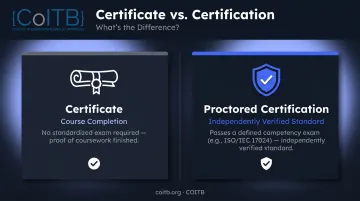
ISO/IEC 17024 is the international standard for personnel certification bodies. It defines how exams are developed, how competencies are assessed, and how the credentialing process is governed. Credentials aligned to this standard carry more weight with employers than simple course completion badges.
Before enrolling in any program, check whether it requires a proctored exam with a defined passing score — or whether it only requires finishing coursework.
Best IT Certifications for Beginners
Every credential listed here meets the same baseline: no or low prerequisites, employer recognition, practical skill coverage, and genuine accessibility for early-career professionals.
CompTIA Tech+ (Formerly IT Fundamentals / ITF+)
CompTIA's foundational, vendor-neutral credential covers hardware, software, networking, security basics, and database fundamentals. Note: The original ITF+ (FC0-U61) was retired July 15, 2024 and replaced by CompTIA Tech+ (FC0-U71). No prior experience is required, and it feeds naturally into CompTIA A+, Network+, or Security+. Exam cost is $138; up to 70 questions, 60 minutes, 650/900 passing score.
Google IT Support Professional Certificate
Delivered through Coursera, this six-course program covers IT support, troubleshooting, networking, operating systems, and cloud computing basics. No prior experience required; most learners finish in 3–6 months at under 10 hours per week. Cost is $49/month (Coursera subscription), with a 7-day free trial and financial aid available.
One distinction worth knowing: this is a course completion certificate, not a proctored exam. It builds solid foundational skills and adds a recognizable name to your résumé — but employers and hiring managers treat it differently from a standards-aligned, proctored credential.
PCEP – Certified Entry-Level Python Programmer
From the Python Institute, PCEP is a proctored certification testing foundational Python: data types, control flow, functions, loops, and basic syntax. No programming prerequisites required. The exam is 30 questions, 45 minutes, 70% passing score — starting at $69, or $86 with a retake included.
For anyone targeting development, data science, or automation roles, PCEP anchors a clear progression: PCEP → PCAP → PCPP1 → PCPP2.
COITB Certifications — Web Development, Application Development, and AI Tracks
COITB is a non-profit credentialing body offering ISO/IEC 17024-aligned certifications across modern technology stacks. Unlike course-completion platforms, COITB credentials require passing a proctored exam.
The credential portfolio is built specifically for candidates with 0–6 months of hands-on experience — career changers, bootcamp graduates, and self-taught developers who need third-party validation employers can independently verify.
What makes COITB different for beginners:
- Multiple disciplines under one credentialing body — front-end, backend, AI, and technical sales
- Remote online proctoring with flexible scheduling (no test center required)
- Military CAC and VA-issued ID accepted for identity verification
- Digital badges issued upon passing, verifiable directly on LinkedIn and employer portals
- ISO/IEC 17024-aligned governance framework, including standardized exam development and defined competency requirements
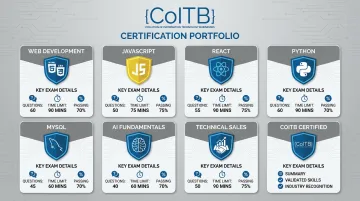
Available certifications and exam specs:
| Credential | Questions | Time | Passing Score |
|---|---|---|---|
| HTML-CSS Web Designer | 90 | 90 min | 75% |
| JavaScript Professional Developer | 90 | 90 min | 73% |
| ReactJS Framework Developer | 90 | 90 min | 73% |
| Professional Python Developer | 58 | 75 min | 70% |
| MySQL Backend Developer | 90 | 90 min | 70% |
| Certified GPT Professional | 60 | 75 min | 71% |
| Technical Sales Specialist | 60 | 75 min | 70% |
For pricing and scheduling, contact COITB directly at coitb.org or email support@coitb.org.
AWS Certified Cloud Practitioner (CLF-C02)
Amazon Web Services' foundational cloud certification covers core cloud concepts, AWS services, pricing, security basics, and architecture fundamentals. No hands-on technical experience required to sit the exam.
Cloud remains one of the fastest-growing segments in IT infrastructure. Gartner reports that worldwide IaaS spending grew 22.5% in 2024, reaching $171.8 billion. The AWS Cloud Practitioner is the entry point to the full AWS certification path — $100, 65 questions, 90 minutes, 700/1,000 passing score.
How to Choose the Right IT Certification as a Beginner
The single most common mistake beginners make: picking a certification based on name recognition rather than career alignment. Here's a more practical framework.
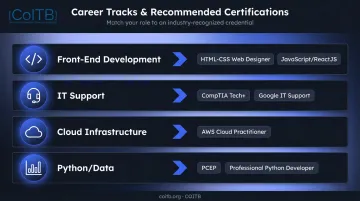
Step 1 — Reverse-Engineer from Job Postings
Search 10–15 entry-level job postings for the role you want. Note which certifications appear in requirements or preferred qualifications. This tells you exactly what employers in that role are screening for — more reliably than any generic rankings list.
- Front-end development roles: HTML-CSS Web Designer and JavaScript/ReactJS credentials appear consistently in job listings.
- IT support roles: Vendor-backed credentials from major infrastructure providers (CompTIA, Google) are common requirements.
- Cloud infrastructure roles: Provider-specific cloud practitioner credentials are near-universal screening criteria.
- Python or data-adjacent roles: Python Developer certifications and scripting credentials show up frequently in junior listings.
Step 2 — Evaluate the Credentialing Body
Credential names mean little without a credible issuer. Look for:
- Proctored exams with a defined passing score — not just course completion badges
- ISO/IEC 17024-aligned or industry-recognized bodies — CompTIA, AWS, the Python Institute, and COITB all fall into this category
- Governance documentation — reputable bodies publish exam objectives, appeals processes, and candidate policies publicly
Avoid platforms that issue completion badges without any assessed competency. They don't carry the same signal to employers.
Step 3 — Factor in Cost and Time Honestly
Map out total spend including study materials and potential retakes. Most beginner certifications require fewer than 80 hours of preparation — achievable in 2–3 months of part-time study.
Quick reference on reported prep time:
- COITB ReactJS Framework Developer: typically 40–60 hours for candidates with basic JavaScript familiarity
- COITB HTML-CSS Web Designer: 20–35 hours for learners with some design or markup exposure
- COITB Professional Python Developer: 30–50 hours building on foundational scripting knowledge
- COITB Certified GPT Professional: 15–25 hours for professionals already familiar with AI tools
- Infrastructure-track credentials (cloud, IT support): vendor estimates range from 6 hours to 6 months depending on the provider and delivery format
Step 4 — Treat the Certification as a Signal, Not a Substitute
Employers increasingly screen for demonstrated ability alongside credentials. A candidate who holds a ReactJS certification and can show two personal projects is far more competitive than one who only holds the credential. The certification gets you past the initial screen — what you've built determines whether you get the offer.
Practical ways to pair credentials with proof:
- Push personal projects to GitHub and link them in your résumé
- Build one small end-to-end project using the exact tech the certification covers
- Add your digital badge to LinkedIn so recruiters see it during sourcing
Conclusion
No single certification fits every beginner. The best one aligns with your target career path, comes from a recognized or standards-aligned credentialing body, and can be backed up with real applied skills.
From there, the path is straightforward: start with an entry-level, no-prerequisites credential, build practical experience alongside it, and stack additional credentials as your career develops.
If your target is web development, application development, or AI, COITB's ISO/IEC 17024-aligned certification programs are built for exactly where you are right now. Credentials cover HTML/CSS, JavaScript, React, Python, MySQL, and GPT — the skills employers are actively hiring for. COITB certifications are designed for candidates with 0–6 months of experience, including:
- Career changers entering tech from non-technical backgrounds
- Bootcamp graduates validating their skills with a third-party credential
- Self-taught developers who learned through freeCodeCamp, Udemy, or similar platforms
- Transitioning veterans and military spouses seeking portable, remote-friendly credentials
Visit coitb.org or email support@coitb.org to explore current certifications, take a free practice assessment, or get in touch with the team today.
Frequently Asked Questions
What is COITB's Professional Python Developer certification?
What is COITB's Professional Python Developer certification?
COITB's Professional Python Developer certification validates practical Python skills — including scripting, data handling, and application logic — through a remote-proctored exam. It targets developers with 0–6 months of hands-on experience and is designed as a third-party credential for self-taught learners and bootcamp graduates.
How hard is the COITB Professional Python Developer exam?
The exam runs 75–90 minutes with 58–90 scenario-based items and a 70–75% passing threshold. Candidates with 1–3 months of hands-on Python practice typically pass on their first attempt. Remote proctoring means you can test from home with a webcam and stable internet connection.
Is the COITB Python Developer certification worth it for beginners?
Yes, particularly if you're self-taught or a bootcamp graduate who needs a third-party credential to validate your skills on a résumé. It's structured for early-career developers, not advanced engineers — making it one of the few Python credentials realistically accessible without years of production experience.
What is the easiest IT certification for beginners with no experience?
CompTIA Tech+, PCEP, the Google IT Support Professional Certificate, and COITB's HTML-CSS Web Designer and JavaScript Professional Developer certifications are all accessible starting points requiring no prior IT experience. Most need 30–80 hours of preparation.
Do IT certifications actually help you get a job?
Yes — particularly when they come from recognized or standards-aligned bodies. A Coursera employer survey found U.S. employers were 74% more likely to hire candidates with professional certificates. Certifications help pass résumé screening; a portfolio of hands-on work helps convert interviews into offers.
How long does it take to earn a beginner IT certification?
Most entry-level certifications require 30–150 hours of preparation depending on the credential and your background — roughly 4–12 weeks of part-time study. The exam itself typically runs under 90 minutes.